Setting up an environment for Ruby Programming
Introduction
The purpose of this tutorial is to get you acquainted with the
mechanics of setting up an environment for working with Ruby and to
explain some of the standard tools.
Note that I’ve also linked some instructions on the Resources page.
RVM
RVM is a version manager for Ruby. Unlike other communities, Ruby
developers often switch versions of Ruby and break code that worked in
previous versions. Becuase of this, maintaining multiple Ruby
installations is useful. For CMSC330, we’re going to be using Ruby
version 1.9.3. You might have a version of Ruby installed by
default, but it’s best to install a new one with RVM to make sure it’s
the version we want.
Note: The Ruby community embraces non-backwards-compatible
changes. Make sure you get 1.9.3, if you’re seeing strange
results, check your version!
The install instructions for RVM are here.
RubyGems
Note: We won’t be using RubyGems in CMSC330, so you can safely
skip this section. Developing Ruby applications.
Libraries in Ruby are called gems. Ruby gems make it super simple
to things like parsing JSON and sending email:
gem install json
And in your Ruby code (say a file hello.rb):
require 'rubygems'
require 'json'
JSON.parse("{\"hello\":1}")
I did it on the command line:
(main):008:0> JSON.parse("{\"hello\":1}")
=> {"hello"=>1}
It returns a ruby Hash, which is Ruby’s version of a map in Java. Don’t worry about this too much, we’ll go over it in detail.
Flycheck mode
If you’re using emacs, the flycheck mode (plugin) allows emacs to
highlight malformed code. As an example, if I write code that won’t
syntax-check when I pass it into Ruby, it will warn me by highlighting
the offending line.
And here’s a picture of it working!
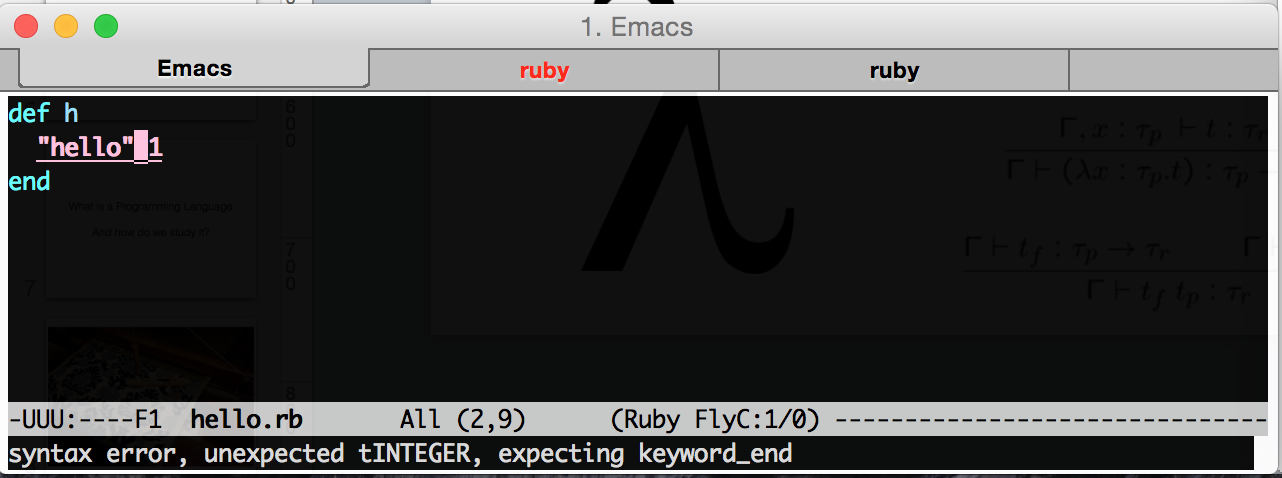
Here I’ve tried to define a function h, but I can’t juxtapose a
string and number: that’s invalid syntax. Emacs tells me, as I
highlight over it. Notice that the bottom FlyC:1/0 tells me there
is one error in the buffer.